 NetUtil
Network Utility is back
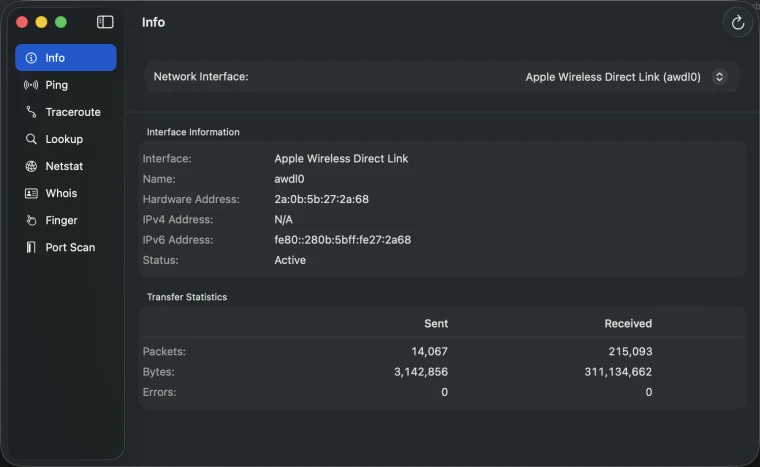
Apple removed Network Utility from macOS. NetUtil brings it back with a modern interface. Ping, traceroute, DNS lookup, port scan, and more.
Requires macOS 14.6 Sonoma or later
Remember Network Utility?
For over 20 years, Network Utility was the go-to app for diagnosing network issues on Mac. Then Apple quietly removed it in Big Sur. No announcement. No replacement. Just gone.
NetUtil fills that gap.
Seven essential tools
Everything Network Utility had, rebuilt for modern macOS.
Ping
Test connectivity to any host. See response times in real-time with clear statistics.
Traceroute
Map the path to any destination. Identify where slowdowns or failures occur.
DNS Lookup
Query DNS records. Check A, AAAA, MX, CNAME, TXT, and more.
Netstat
View active network connections. See what's connected and what's listening.
Whois
Look up domain registration info. Find ownership and contact details.
Port Scan
Scan for open ports on any host. Check if services are running and accessible.
For live port monitoring, try Portie.
Built for modern macOS
Native SwiftUI app that feels right at home on your Mac.
Native macOS App
Built with SwiftUI for Apple Silicon and Intel Macs. Fast, responsive, and feels native.
Real-Time Results
See results as they happen. No waiting for commands to complete.
Privacy First
Everything runs locally on your Mac. No data sent to external servers, no analytics.
Clean Interface
Results displayed in readable tables and formatted output. No raw terminal text.
No Terminal Required
Get the power of command-line tools without memorizing syntax or parsing text output.
Completely Free
No ads, no in-app purchases, no subscriptions. All features included.
Completely free
No ads. No in-app purchases. No strings attached.
free forever
- All features included
- No ads or tracking
- Free updates
- Works on Apple Silicon & Intel
Requires macOS 14.6 Sonoma or later.
From the Blog
View all →How to Change DNS Settings on Mac
Step-by-step guide to changing DNS on macOS Sequoia, Sonoma, and Ventura. Covers Cloudflare 1.1.1.1, Google 8.8.8.8, …
2026-05-16How to Check Open Ports on Mac: lsof, netstat, and nc
Check open ports on Mac using lsof -i :3000, netstat, and nc. Covers local port checking and testing remote hosts, with …
2026-05-16How to Flush the DNS Cache on macOS (Sequoia, Sonoma, Ventura)
Learn how to clear your DNS cache on macOS with one terminal command. Fixes stale DNS records after domain changes, …
2026-05-16More Mac tools
Small, focused utilities from the same person who made NetUtil.